Troubleshooting Eddy Current Sensor Error
If this is your first time installing an SV08 Max gantry, please refer to these steps to calibrate the gantry:
https://youtu.be/koHnSxnTe7o?si=nVcOKZg6q38o9tky
¶ !! Error during homing probe: Eddy current sensor error
Symptom: After the X and Y axis reset, the Z axis keeps pressing down on the heat bed, and the printer reports an error.
Possible Causes:
1. Abnormal Eddy Current Sensor Board: The detected current value deviates from the expected range (14 or 15).In older firmware versions, only a value of 15 was considered normal. Starting from firmware version 2.1.19, a value of 14 is also valid. Please verify your current firmware version.
2. Misalignment of the Gantry or Heatbed: The AB-axis gantry and heatbed are not parallel, causing the eddy current sensor to tilt or the sensor board to be improperly positioned. This leads to abnormal current readings.
Solution:
1.In Mainsail, execute the command: LDC_CALIBRATE_DRIVE_CURRENT CHIP=eddy
This will read the current value from the eddy current sensor board.
If the returned value is not 14 or 15, please take a screenshot and provide it to Sovol Support for further assistance.

2.If the Current Value is Normal (14 or 15):
The issue is likely mechanical alignment. Use two blocks of identical height (e.g., filament spool holders, glue sticks, or dedicated alignment blocks) to manually level the AB-axis gantry relative to the heatbed.
Please follow this video guide for the calibration procedure: https://youtu.be/uhrW4nUz1-c
After performing the mechanical gantry alignment, you must repeat both calibration procedures:
Run the current calibration again: LDC_CALIBRATE_DRIVE_CURRENT CHIP=eddy
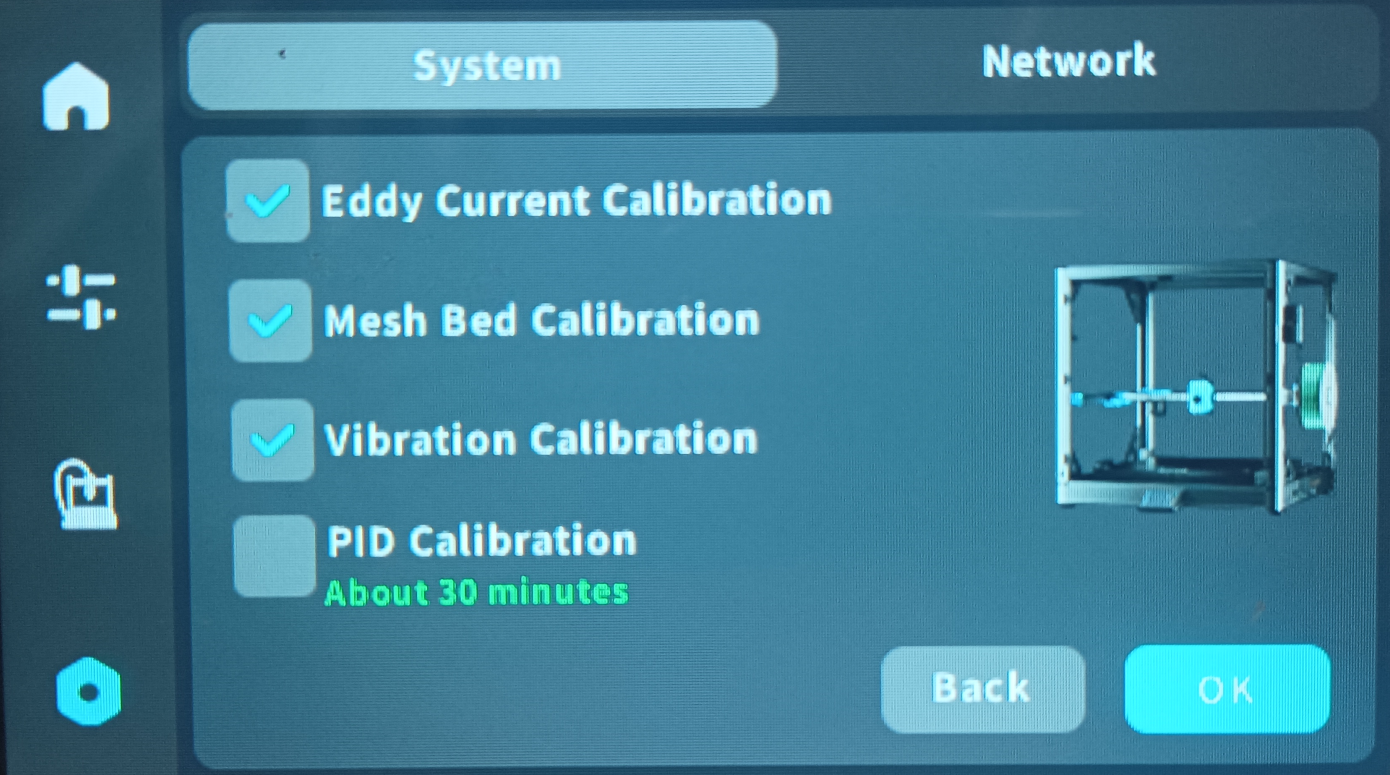
Perform the eddy sensor calibration (please refer to the provided reference image for this step).
¶ !! Zoffset Calibration: Toolhead probe more than ten times.
Symptom: After X and Y axis reset, eddy current calibration fails more than 10 times.
Issue: After X and Y axes homing, the eddy current calibration fails repeatedly (over 10 times).
Cause:
The AB axes are not level, or the eddy current sensor board is tilted. This causes an abnormal tilt in the eddy current field, leading to incorrect current readings from the sensor board.
Solution:
Use alignment blocks (or any objects of equal height) to level the AB-axis gantry and ensure the eddy current sensor board is properly aligned.
Then, perform the current calibration using the command:
LDC_CALIBRATE_DRIVE_CURRENT CHIP=eddy
Finally, run the eddy current calibration again.
¶ !! Error during homing Z: Eddy current sensor error
Symptom: The eddy current sensor reports an error when the nozzle presses against the hot bed plate during initial startup or after multiple prints.
Causes:
1. During initial startup, the nozzle pressing plate is uneven along the AB axis due to assembly issues, causing the eddy current plate to tilt and resulting in abnormal eddy current readings.
2.After multiple prints, an eddy current sensor error occurs due to uneven belt tension across the four Z-axis belts,foreign objects trapped in the gears, ormotor resistance causing the AB axes to become unlevel.
Solution:
1.Use alignment blocks (or objects of equal height) to level the AB-axis gantry or adjust the eddy current sensor board. Then, perform both current calibration and eddy current calibration.
Refer to this video guide for the procedure: https://youtu.be/uhrW4nUz1-c
2.Check the four Z-axis belts for consistent tension and inspect the gears for any foreign objects that may be causing the AB axes to become unlevel.
¶ !! Endstop Z still triggered after retract
Symptom: After X and Y axis reset, the Z axis does not move downwards, and an error occurs.
Cause: The AB axis is uneven, causing the eddy current plate to tilt, resulting in abnormal eddy current readings.
Solution: Use a height-adjusting column to correct the AB axis or correct the eddy current plate, then perform current calibration and eddy current calibration. Please refer to the short video for calibration: https://youtu.be/uhrW4nUz1-c
¶ !! Invalid probe eddy_curvent height
Symptom: After X and Y axis reset, the Z axis does not move downwards, and an error occurs.
Cause: The AB axis is uneven, causing the eddy current plate to tilt, resulting in abnormal eddy current readings.
Solution: Use a height-adjusting column to correct the AB axis or correct the eddy current plate, then perform current calibration and eddy current calibration. Please refer to the short video for calibration: https://youtu.be/uhrW4nUz1-c
¶ !!LDC1612 12C bus busy or timeout error, please check the connection between the sensor module and the mainboard.
Symptom: After a full reset or calibration, after the X and Y axes reset, the Z axis moves fully, reporting an I/O communication error, and all motors are unlocked.
Solution: 1. Check the eddy current sensor's wiring and reinstall it.
2.If the LED lights up, contact SOVOL to replace the eddy current board.
Current calibration command: LDC_CALIBRATE_DRIVE_CURRENT CHIP=eddy